
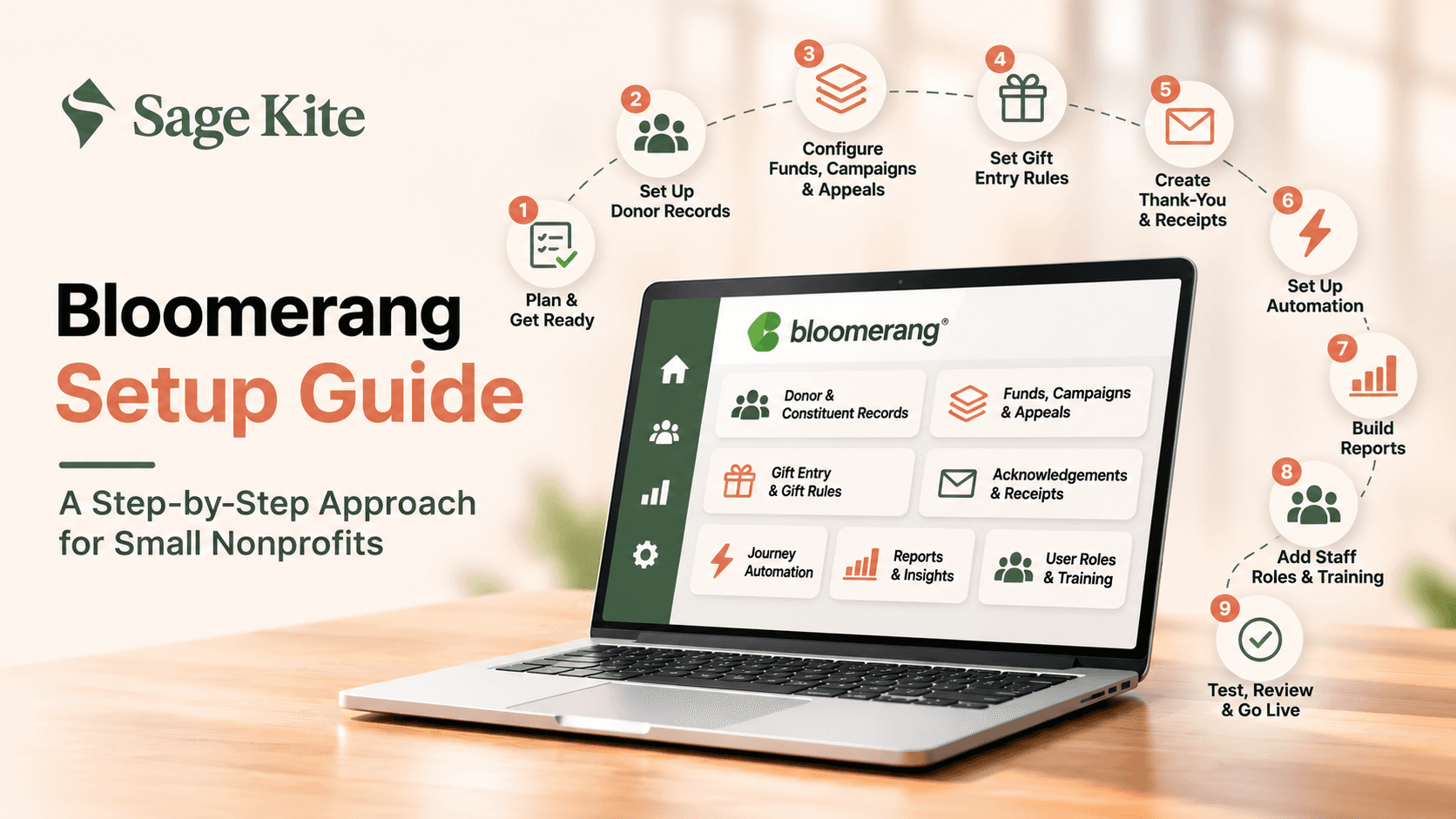
You have chosen Bloomerang. Maybe the agreement is signed and an onboarding specialist has introduced themselves. The next stretch decides whether the database helps you or quietly works against you: setting it up around how your nonprofit actually raises, records and reports money.
Bloomerang setup is more than entering donor names. It means deciding how records are structured, how every gift is coded, who thanks donors and how, which messages are automated and what your board needs to see. Make those decisions once, on purpose, and the database stays consistent as staff and volunteers change. Skip them, and you usually find out months later, when two reports disagree.
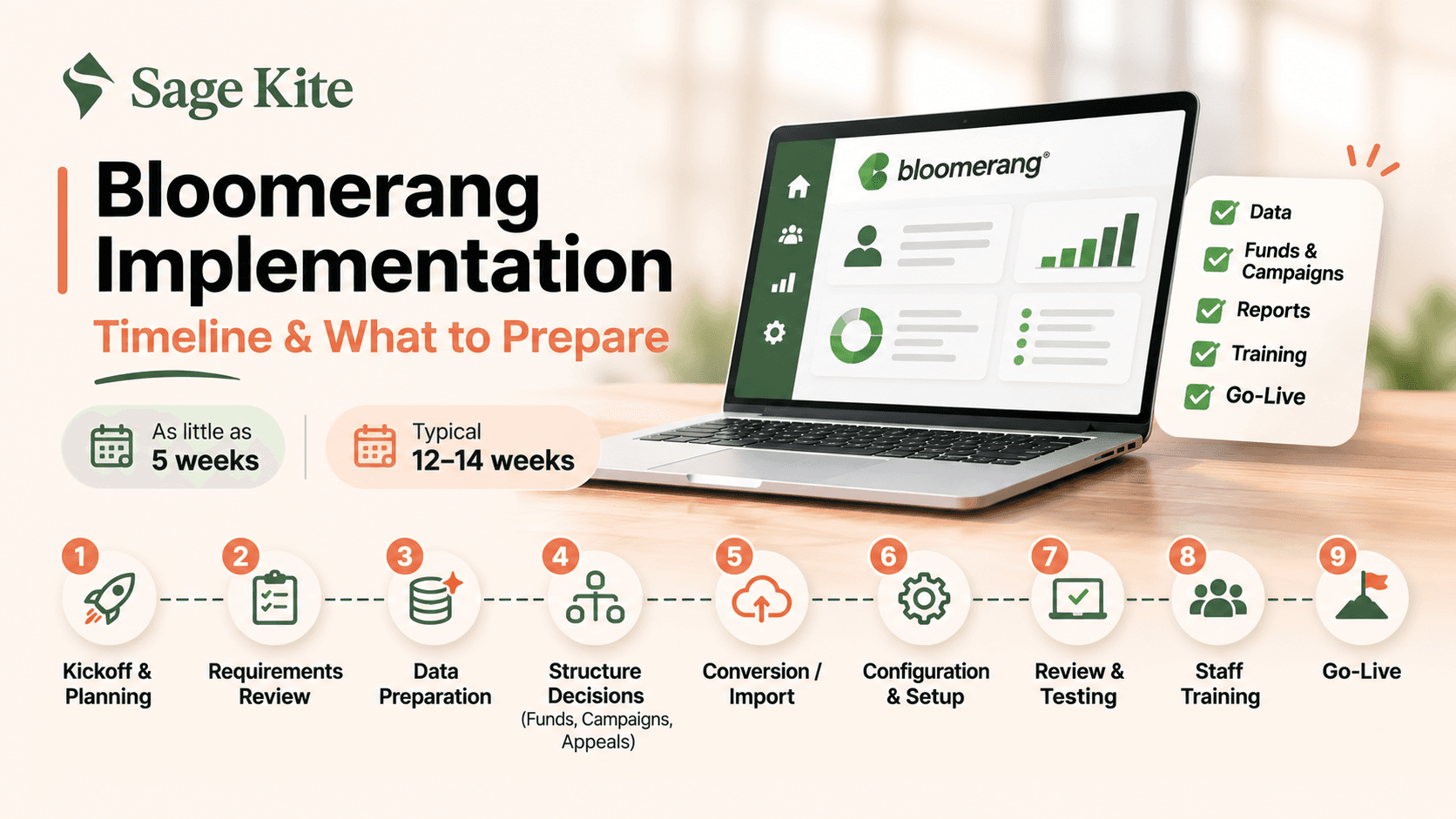
This guide walks a small nonprofit through the whole Bloomerang setup sequence: what to prepare, nine setup steps, a checklist, common mistakes and when outside help is worth it. It focuses on decisions rather than clicks. Where a topic deserves its own guide, such as data migration or household cleanup, we say so and stay at the setup level.
The short answer. To set up Bloomerang for a small nonprofit, first write down how money reaches you and what leadership needs to see. Then configure, in this order: your Bloomerang products, donor records, funds, campaigns and appeals, gift-entry rules, thank-you and receipt processes, automation, reports and user roles. Finish by testing with a sample donor and gift before real data goes in.
What should you prepare before setting up Bloomerang?
Most setup problems start before anyone logs in. An hour of preparation saves rework later, and none of it needs a technical background.
Map how money actually reaches you
List every route: checks in the mail, online forms, events, payroll giving, donor-advised funds, other payment platforms. Each route is a place where a gift can be missed or entered differently. Bloomerang's own advice for a first donor CRM includes a recurring monthly reminder to check every platform you receive money from and add those gifts (Bloomerang, 7 tips for setting up your first donor CRM).
Decide what you need to track
Write down the questions you will want the database to answer: who gave last year, who has lapsed, which appeal worked. Then track only what supports those questions. Every extra field is something staff must fill in the same way, every time.
Look honestly at your current records
If you are bringing data from a spreadsheet or another system, check it for duplicates, inconsistent names and missing addresses now. Bloomerang's team handles conversion where it is included in your plan, so your job is to prepare data and review it afterwards. A separate guide covers that process.
Sketch your fundraising structure on paper
Which gifts are restricted to a purpose? What are your main fundraising efforts this year? Which individual mailings or emails do you want to compare? Those three questions become funds, campaigns and appeals in Step 3.
Name the people and decide what leadership needs
Decide who will enter gifts, who will thank donors, who will run reports and who is the main administrator. Ask your executive director or board what numbers they actually look at, for example total raised against goal and donor retention. Reports are built from how gifts are coded, so reporting needs should shape setup, not follow it.
How to set up Bloomerang for a small nonprofit: nine steps
Work through these in order. Each step says what to configure, why it matters, what to decide and what to avoid. Exact screens change, so the official help articles are linked where they matter.
Step 1: Confirm which Bloomerang products and plan you have
Bloomerang's Giving Platform includes Bloomerang CRM for donor management, Bloomerang Fundraising (formerly Qgiv) for donation forms, events and peer-to-peer, and Bloomerang Volunteer. What you can do depends on which you bought and your plan. For example, your license sets how many Journey Automations can run at once, and Bloomerang says organizations new to the platform that have CRM with Fundraising or Volunteer are connected automatically during onboarding (Bloomerang changelog). Ask your onboarding specialist what your package includes. Do not assume a feature seen in a demo is in your plan.
Avoid: planning around a tool you do not have, or paying for a second tool for something you already own.
Step 2: Organize constituent and donor records
Bloomerang calls everyone in the database a constituent: donors, volunteers, prospects, organizations. Individuals can be grouped into households. Per Bloomerang, a household counts as one record toward your license, and one member is the head of household whose contact details are used when you communicate with the household (about relationships and households).
Couples need a deliberate rule. Bloomerang sends email only to the primary email address on each record, so spouses who want separate emails need separate records (enter spouse data). Either choice is valid. Mixed choices with no rule are what cause trouble.
Custom fields store anything the defaults do not. They can live on the constituent, transaction, interaction or note (custom field basics). Add one only when you know the report or segment it will serve, and agree on how it is filled in.
Avoid: inconsistent name and address formats, and creating households sometimes and not others. Household structure and cleanup get their own guide.
Step 3: Establish your funds, campaigns and appeals
In Bloomerang these are three fields on a transaction that explain why money was given and what it is reserved for (fund, campaign and appeal basics). In plain terms: a fund is what the money is for, such as unrestricted, programs or scholarships. A campaign is a larger effort, such as an annual campaign or capital campaign. An appeal is a specific solicitation, such as a spring mailing or a Giving Tuesday email. Bloomerang Academy training describes the fund as the only one of the three that is required (session slides).
Because they are tied to transactions, funds, campaigns and appeals cannot be deleted once used, only deactivated, and each name must be unique (create and manage). Choose names you can live with.
Illustrative example (hypothetical). A small food bank might use funds named Unrestricted, Food Programs and Building; a campaign for each fiscal year's annual fund; and appeals for each mailing or email. Its board report then answers “how much came from the spring mailer, and was it restricted?” without a spreadsheet.
Decide: keep the list short and match your finance team's categories. Avoid: a new fund for every idea, and different spellings of the same thing. Detailed coding examples belong in the dedicated gift-coding guide.
Step 4: Write your gift-entry rules
Gift entry is where consistency is won or lost. Write one page covering who enters gifts, how soon, and how each type is recorded: checks, online gifts from other platforms, recurring gifts, in-kind gifts and soft credits. Include how to check whether a donor already exists before adding someone new.
Illustrative example (hypothetical). Three people enter the same type of gift. One uses the campaign field, one leaves it blank, one puts the appeal name in a note. The year-end report shows a third of the money as uncoded. A one-page rule written before launch prevents this.
Step 5: Set up acknowledgement and receipt processes
Decide who thanks donors, how quickly, and by what route (email, letter, phone). A receipt and an acknowledgement are not the same thing. Bloomerang's automation guidance asks you to choose the correct purpose type for each email and to plan how automated thank-yous will replace any scheduled acknowledgement emails you already send (plan your automations).
For year-end, Bloomerang can email giving statements each January (email year-end giving statements), and letters suit donors without a valid email (mail year-end tax receipt letters). Confirm the wording of tax receipts with your finance lead or accountant. Setup is the time to agree it.
Avoid: nobody owning the thank-you process, and old and new acknowledgements running together so donors get two.
Step 6: Choose communication and automation priorities
Journey Automation, generally available since July 2025, sends timed, personalized messages based on a constituent's donor lifecycle stage, activity, group or milestone (about Journey Automation). Your license includes three running automations, with an option for unlimited (plan your automations). Bloomerang notes that three automations can cover email acknowledgements for a first-ever donation, the first payment of a new recurring gift, and later donations.
For a small team, start there: acknowledge every gift promptly, then add a welcome for new donors. Plan lapsed-donor and cultivation journeys once the basics run cleanly. Automation repeats whatever process you give it, good or bad, so define the process first. Building journeys in detail is a separate topic.
Step 7: Plan your reports and dashboards
Start from the three to five numbers your leadership uses. The Home page shows fundraising progress, retention and to-dos (dashboard on the home page). The Donor Retention report by default counts people who gave 24 to 12 months ago and gave again in the last 12 months, and administrators can change those settings (donor retention basics). Reports can be scheduled to arrive in an inbox daily, weekly or monthly, which suits board members who never log in (Bloomerang reporting).
Two scores appear on constituent records. The engagement level comes from a proprietary formula credited to Dr. Adrian Sargeant (how it is calculated). The generosity score is based only on a DonorSearch rating, is free for CRM customers, and shows as Not Scanned until a constituent is screened (about the generosity score). They are aids to prioritizing, not substitutes for your own judgement, and each has its own guide.
Avoid: building reports before deciding what to measure, or expecting accurate reports from inconsistent coding.
Step 8: Prepare staff, roles and daily workflows
Bloomerang CRM has two user types. Administrators have full access. Standard users have limited access that administrators can customize, which is useful for volunteers who only enter data (user permissions). There is no limit on the number of users, so each person should have their own login (manage users). Name one main administrator and one backup.
Training is part of setup. Bloomerang says new customers get a dedicated onboarding specialist and training resources (getting started), and new organizations are invited to Bloomerang Learning during onboarding (about Bloomerang Learning). Turn your Step 4 gift-entry page into a short written guide for anyone who touches the database.
Step 9: Test the complete setup before relying on it
Create a sample household and a few test donors. Enter one gift of each type you receive and follow it through to thank-you, receipt and the reports you planned. Check that funds, campaigns and appeals show up where you expect, and that nobody gets two acknowledgements.
If you will import records, Bloomerang's import training recommends testing a small sample, up to five constituents, and spot-checking before running the full file (import basics). Imported values such as funds and custom field values must already exist in Bloomerang, because fields and values cannot be created through an import (import fields). Another reason to finish Steps 2 and 3 first.
Bloomerang setup checklist for small nonprofits
Use this as a working list. Items that depend on your plan or on staff decisions are phrased as checks.
Before setup
- Written list of every way money reaches you, including outside platforms.
- The reports and numbers leadership and the board actually use.
- Names of the main administrator, a backup, and who enters gifts.
Database configuration
- Confirmed which Bloomerang products and plan you have.
- A rule for spouses and households, written down.
- Custom fields limited to ones tied to a report or segment.
Gift entry and fundraising structure
- Short list of funds that matches your finance categories.
- Campaigns and appeals named consistently, with a naming convention.
- One-page gift-entry rules, including a check for existing donors.
Donor communication
- Named owner and target timing for thank-yous.
- Receipts and acknowledgements distinguished, and old scheduled emails switched off where automation replaces them.
- Year-end statement approach agreed, including donors with no email.
- First automations chosen within your license limit.
Reporting
- Three to five key reports or dashboard tiles built.
- Scheduled reports set for people who do not log in.
- Retention definition agreed and checked against the default.
Staff readiness
- User accounts created, with volunteers on limited permissions.
- Onboarding and Bloomerang Learning sessions booked.
- Written gift-entry guide shared.
Testing and final review
- Sample donor and gift followed through thank-you, receipt and reports.
- Test import done with a small sample, if importing.
- Test records removed using the method Bloomerang Support recommends.
Common Bloomerang setup mistakes to avoid
- Inconsistent donor information. Different name formats and address styles are what make duplicates likely later.
- No agreed coding structure. Without it, the same gift is coded differently by different people and reports lose meaning.
- No household or spouse rule. Mixed approaches to couples cause split records and confusing mail.
- Reports built before measures are chosen. You get many reports and no answers.
- Automation before process. Journeys repeat your process at scale, including its gaps.
- Duplicate thank-yous. Automated acknowledgements switched on while scheduled emails still run.
- No owner for acknowledgements. Everyone assumes someone else sent it.
- Skipping training and testing. Capterra's reviewer summaries describe Bloomerang as quick to learn for basic tasks, but say administrators handling reports, imports or custom setup typically need more time and support (Capterra).
Can a small nonprofit set up Bloomerang on its own?
Often, yes. Bloomerang provides onboarding, training and a help center, and many small teams get started that way. It tends to work when someone has a few hours a week to own the project, your fundraising is fairly straightforward, and you are starting fresh or with a small, clean file.
It gets harder in a few places: designing a coding structure that matches your finance team's view, deciding what to automate, building reports that answer real questions, and cleaning imported data. Time is the usual limit. A one- or two-person team can find the settings but not the hours to think through them, then maintain the system afterwards. That is a reasonable point to ask for help, not a sign of failure.
When should you hire a Bloomerang setup consultant?
Outside help is worth considering when:
- you have no dedicated CRM administrator and no spare capacity;
- your fundraising process needs to be mapped before it is configured;
- gift-entry and acknowledgement rules do not exist yet;
- you want automation and reporting configured, not just explained;
- staff need training and a written handover; or
- you want to avoid expensive fixes after launch.
Options include Bloomerang's own services, such as quarterly strategic consulting and customized database consulting (Bloomerang consulting), and independent consultants. If a consultant sells you something your onboarding already includes, ask why.
If you want a setup project run for you, you can discuss Bloomerang setup with Sage Kite.
How Sage Kite helps small nonprofits set up Bloomerang
Sage Kite is an independent consultancy. It is not an officially affiliated, endorsed or certified Bloomerang partner. Its Bloomerang setup services follow the same sequence as this guide:
- understanding your fundraising process first;
- mapping the donor journey from first gift to renewal;
- structuring constituent records and households;
- establishing gift-entry and coding rules;
- configuring acknowledgements and receipts;
- setting up the relevant Journey Automations;
- building reporting and dashboards;
- connecting other tools where needed; and
- training your staff, with a written gift-entry guide.
One distinction matters: Bloomerang's own team handles data conversion when it is included in your plan. Sage Kite supports preparation before conversion and checks the result afterwards. It does not replace Bloomerang's conversion team. Sage Kite works with new accounts, existing accounts that need cleanup, and organizations moving to Bloomerang.
See Sage Kite's Bloomerang setup services.
Frequently asked questions
How do you set up Bloomerang for a small nonprofit?
Define how money reaches you and what leadership needs, then configure products, records, funds, campaigns and appeals, gift-entry rules, thank-yous, automation, reports and users, in that order. Test with a sample donor before going live.
What should you prepare before setting up Bloomerang?
A list of every giving channel, the questions you want reports to answer, your fund structure on paper, named roles, and a review of any existing data for duplicates and gaps.
Does Bloomerang include onboarding?
Bloomerang says every organization starting with it gets a dedicated onboarding specialist and training resources. What is included for data conversion depends on your plan, so confirm it in your agreement.
Can a small nonprofit set up Bloomerang without a consultant?
Yes, many do. The difficult parts are the coding structure, automation choices, reports and import cleanup, mostly because of limited staff time.
What should be configured first in Bloomerang?
Confirm your products and plan, then settle record structure and your funds, campaigns and appeals before importing data or building reports. Imports cannot create funds or custom field values.